

Giving feedback
Practicos is built alongside practising therapists, and Give feedback is the quickest way to tell the team what’s working, what isn’t, and what you’d like to see next. It’s built into every screen, so you never have to leave what you’re doing to send a note.
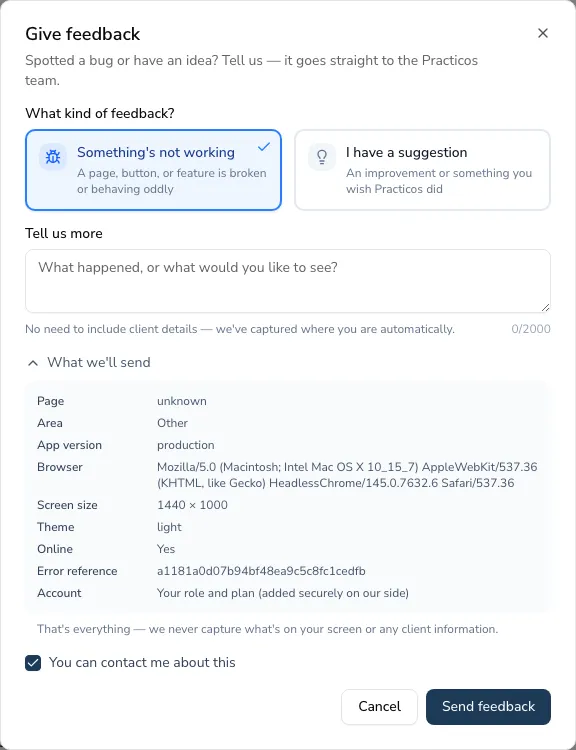
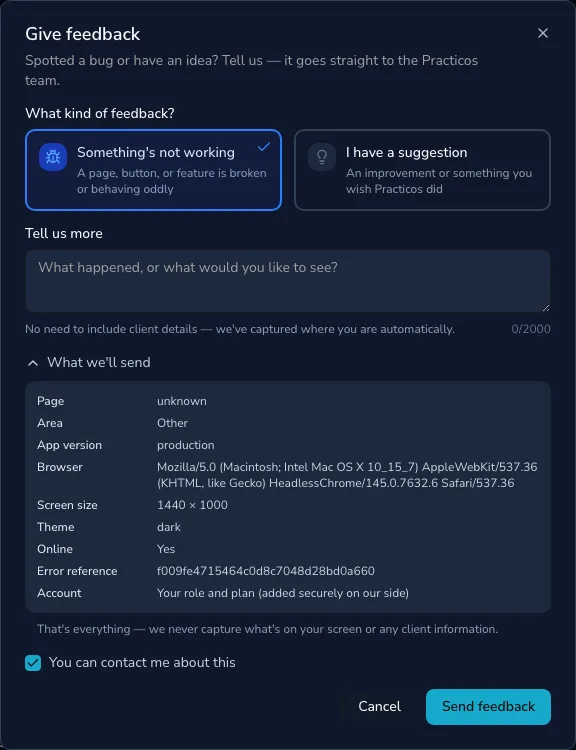
Opening the feedback window
Section titled “Opening the feedback window”-
In the left-hand sidebar, choose Give feedback (near the bottom).
-
On a phone or tablet, tap More, then Give feedback.
If a page ever runs into a problem, the error screen also offers a way to send feedback — it opens the same window with the details already attached, so you can tell us what you were doing when it happened.
Sending your feedback
Section titled “Sending your feedback”-
Choose the kind of feedback:
- Something’s not working — a page, button or feature is broken or behaving oddly.
- I have a suggestion — an improvement, or something you wish Practicos did.
-
Under Tell us more, describe what happened or what you’d like to see. There’s no need to include client details — Practicos records which page you were on for you.
-
Choose Send feedback. You’ll see a short Thanks — we read every one message once it’s on its way.
What’s sent — and what never is
Section titled “What’s sent — and what never is”Practicos is careful with your data, so the feedback window shows you exactly what it will attach before you send. Choose What we’ll send to expand it. It includes practical things that help the team understand the context — the page you’re on, your app version, your browser, screen size and theme — and nothing about your clients.
- Practicos never captures what’s on your screen or any client information.
- Any record references are ID numbers only, never names. They’re visible only to the Practicos team and are deleted after 90 days.
- Your role and plan are added securely on our side to help us make sense of your feedback.
Leave You can contact me about this ticked if you’re happy for the team to follow up with you — for example, to ask a quick question or let you know when a fix is out. Untick it if you’d rather not be contacted.