

Practice details and branding
Your practice details — name, logo, contact and business information — are set once here by an owner or manager, then reused everywhere Practicos represents you: on invoices, appointment reminders and the calendar’s default hours, rather than re-entering them each time.
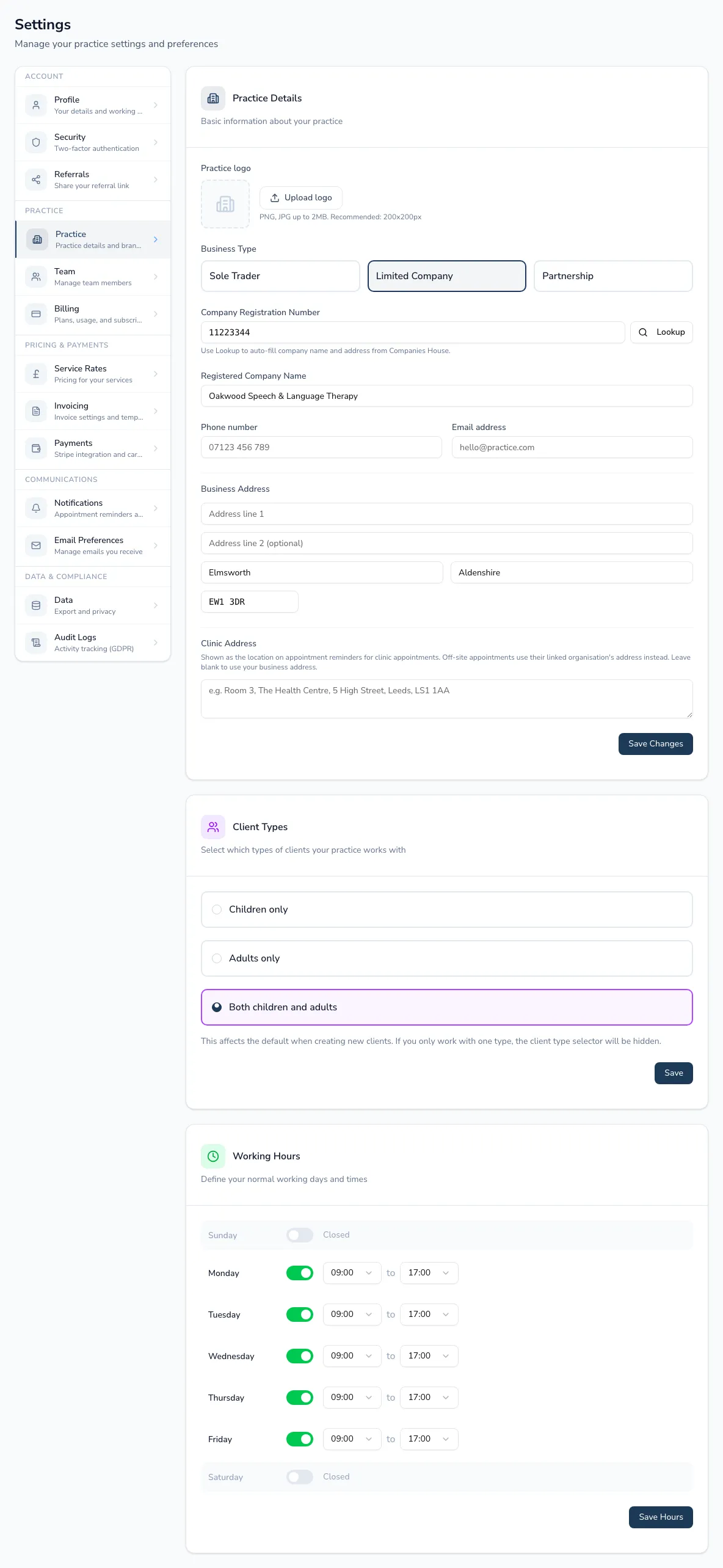
Your business details
Section titled “Your business details”- Logo — upload or remove it; it appears on invoices and reminder emails.
- Business type — sole trader, limited company or partnership. For limited companies, enter your company number and use the Companies House lookup to auto-fill your registered name and address rather than typing them in by hand.
- Practice/trading name, phone number and email address.
- Business address — your registered or correspondence address.
Where clients see you
Section titled “Where clients see you”Clinic address is shown as the location on appointment reminders for clinic-based appointments. Off-site appointments (at a school or other organisation) use that organisation’s own address instead — leave this blank to fall back to your business address.
Client types
Section titled “Client types”Choose whether the practice works with children, adults, or both. This sets the default when adding a new client — and if you only work with one type, the client-type question disappears from the new-client form altogether, so nobody’s asked something that doesn’t apply.
Working hours
Section titled “Working hours”Set your normal working days and hours in half-hour steps. These are your practice-wide hours — the default your calendar uses.
Business details, client types and working hours each save independently, so you don’t need to fill in every section in one sitting.