

Creating and scheduling workshops
A workshop template is a session you run again and again — a parent-training evening, an INSET day, a group programme — built once with its description, duration, capacity and price, so you can schedule it each term instead of re-entering the same details or losing track in a spreadsheet.
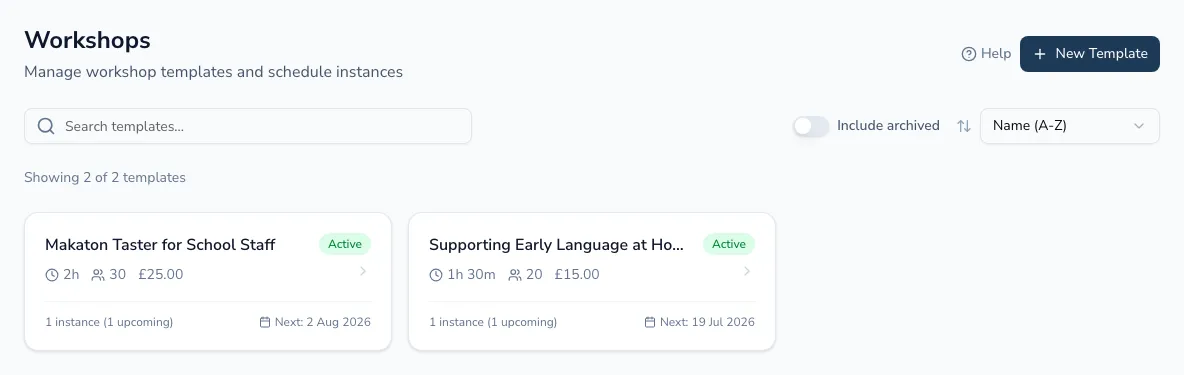
Building a template
Section titled “Building a template”-
From the Workshops page, choose New Template.
-
Add a title and description, and set the default duration, capacity and price. These carry over to every instance you schedule, and you can still override them for an individual date.
From a template you can edit it, archive it (it disappears from your active list but existing scheduled instances aren’t affected, and you can bring it back any time) or delete it — deletion is blocked while it still has upcoming instances, so you can’t lose a session people are already booked into by mistake.
Finding the template you need
Section titled “Finding the template you need”Once you’ve built up a library, the Workshops page lets you:
- Search by name.
- Sort by name, next instance date, or how many times you’ve run it.
- Include archived templates when you need to bring one back.
Each template card shows how many instances you’ve run, how many are upcoming, and when the next one is — so you can see what needs attention without opening it.
Scheduling an instance
Section titled “Scheduling an instance”An instance is one dated running of a template — the actual session people book onto. From a template, choose Schedule instance and work through:
-
Date and time.
-
Location — in person, online, or at an organisation, with room or meeting-link details.
-
Capacity — the template’s default, or your own number for this date.
-
Type — a public workshop anyone can book, or one commissioned by an organisation.
-
Practitioner — who’s running it, plus a cancellation deadline for anyone who books on and later can’t come.
Next: Running a workshop — the registration link, attendee management and certificates.