

Your Practicos subscription
Your Practicos subscription — your plan, seats, payment card and receipts — is managed here, kept completely separate from the invoices you send your own clients.
Your plan
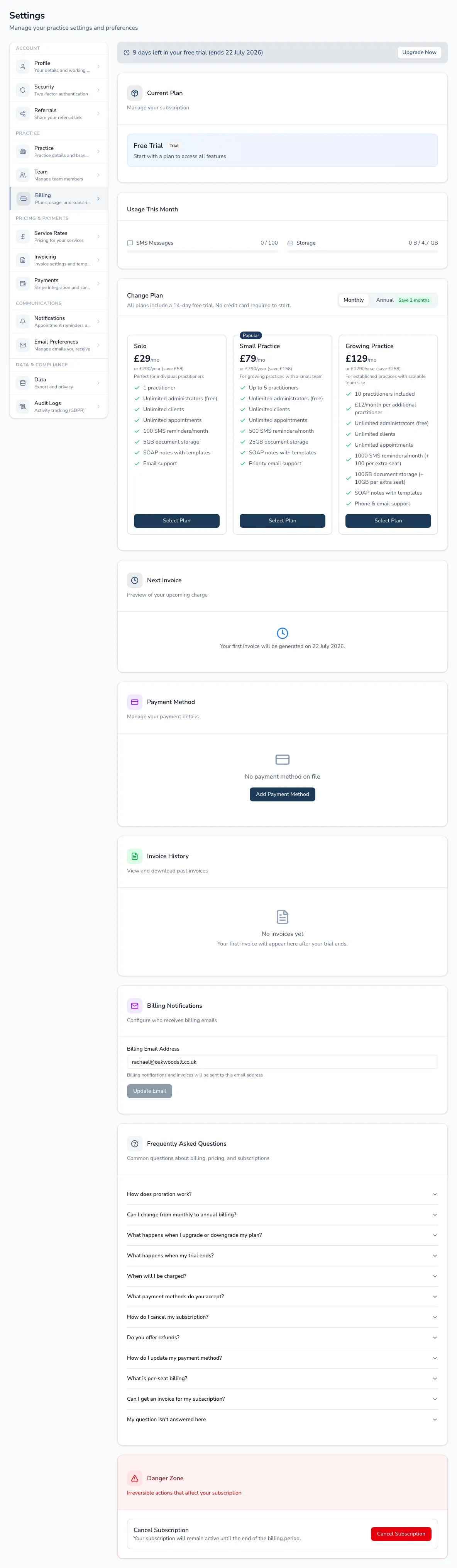
Section titled “Your plan”See your current plan and status (active, trial, payment failed or cancelled), and the price. On Growing Practice you’ll see a per-seat breakdown (base seats included, extra practitioner seats charged per seat, administrators free).
Changing plan
Section titled “Changing plan”Choose between Solo, Small Practice and Growing Practice, and toggle monthly or annual billing (annual saves two months). Before a change takes effect you’ll see a proration preview of the next invoice; a downgrade warns you if your seats, admins or storage don’t fit the smaller plan.
Usage, payment and invoices
Section titled “Usage, payment and invoices”- Usage this month — SMS credits and storage against your plan’s limits, with low-credit warnings.
- Payment card — view the card on file and update it via the Stripe billing portal.
- Invoices — download your past Practicos invoices.
- Billing email — set where billing notifications go.
Trials, cancelling and reactivating
Section titled “Trials, cancelling and reactivating”Trials show days remaining with an upgrade prompt. You can cancel (you keep access until the end of the period) and reactivate later.